RSS

Author Archives: MS Licensing

Microsoft Dynamics and Office Mobility Rights

Here’s a great article from Linda Rosencrance (writer from http://www.MSDynamicsworld.com).  You can read her article and her interview from a SPLA guru (aka me) and other hosting providers. It’s a great resource, especially for Dyanmics hosters.  The article is titled “Microsoft Dynamics ERP SPLA customers punished by lack of Office license mobility, hosting partners say”  Here is the link for those interested (Click here)  You must create a free log in.

I wouldn’t say “punished” because that insinuates you did something wrong.  You didn’t do anything wrong (unless you flat out don’t report).  I’ve always said that service providers need to change their game.  As quoted in the article “don’t focus on what you can’t do…focus what you CAN do.”  That’s what I’m here for; to help uncover what you can do that no one else has.  To quote my old coach “let’s do this!”

Thanks,

SPLA Man

 
Leave a comment

Posted by on November 1, 2014 in Uncategorized


Rapid Fire -20 Random Yes/No SPLA Questions…Answered

I figured I would switch things up a bit.  Here’s twenty random questions regarding SPLA.  All of which are yes/no and all of which are true.  (even the SPUR/enjoyable to read question..I kind of like uncovering licensing gotchas).

1. Can I have customers bring a license to my datacenter?

Yes. Check out https://splalicensing.com/category/license-mobility/

2. I am being Audited can you help?

Yes.

3. Is it my responsibility to keep track of all licenses in my datacenter; even customer owned?

Yes.

4. I am always late with my SPLA usage report.  Is this a problem?

Yes – come on man…it’s against the agreement!

5. Can I run multiple instances of SQL on the same VM

Yes.

6. Is it written down in a document that I cannot host using my own licenses?

Yes.

7. Can I still report SQL Enterprise SAL?

No.

8. Do I get two VM’s with Windows Standard?

No.

9. Can I offer true VDI as a service?

No.

10. Can I use a reseller to sell my solution?

Yes.

11. Does a new SPUR come out each quarter?

Yes.

12. Do I need to license the server and each user?

No.

13. Can I use my own volume licensing to host Microsoft software?

No.

14. SPLA and External Connector licenses…same thing?

No.

15. Does SQL Enterprise and Windows Datacenter offer unlimited virtualization?

Yes.

16. Does license mobility cover all products in SPLA?

No.

17. Have you managed SPLA for a long time? Would you consider yourself a SPLA Expert?

Yes…but that’s two questions.

18. Do you find the SPUR enjoyable to read?

Yes.

19. If a product is covered with license mobility within server farms in the PUR, does that mean it is also covered with license mobility to a third party datacenter?

Yes.

20. Can I ask you any SPLA related question and you would give me an answer?

Yes.

 
4 Comments

Posted by on November 1, 2014 in Uncategorized


SQL Enterprise – it’s more than virtualization

I sat in on a webinar this afternoon and was really impressed with the different capabilities within SQL Enterprise.  I always sold SQL based off virtualization needs.  What a goof. Although important, there are several other factors that go into licensing SQL Enterprise as to Standard or Web.

Let’s first break the different components down to better understand the differences.

SQL Web – Basic SKU.  Designed for hosting web apps and websites.  Many hosting providers try to license SQL Web to support line of business applications. (which you cannot do by the way) Think of line of business applications as applications to run your business.  (very poetic by the way).

SQL Standard – The most common reported SKU in SPLA but also the one that gets service providers in trouble; especially as it pertains to virtualization and mobility within server farms.  Offers some high availability, although not as complete as Enterprise.  Database size is also an issue as it only supports up to 64GB.  Sounds like a lot, but ask a SQL admin how much that really is.  Newer editions offer mobility rights, and can be licensed on a per VM basis.  Not a bad thing.

SQL Enterprise – Ahh…SQL Enterprise.  This cost a lot doesn’t it?  Man, how can someone afford this month end and month out?  Ask your reseller what’s the difference between Enterprise and Standard and the first thing they will say is virtualization. (that’s what I did too for the record) Although true, there’s more to this than just virtualization.  For starters, the size alone is more than Standard.  (See chart below).  High availability with Enterprise is truly high availability.  It’s always on (Failover cluster instances and availability groups).  Although costs seem high, if data is lost, how much will that cost you?

SQL BI – The in between SKU, meaning its similar to Standard, but not as robust as Enterprise. In the SPLA world, it is licensed by user only.  This “Jan Brady” of SQL has…..you guessed it….BI features.  This SKU is very rarely reported.  If I had to guess, she will be merged or have licensing changes with future releases. No basis or knowledge, just an educated guess.

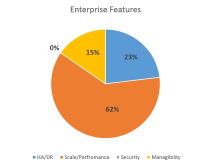
So back to SQL Enterprise.  I think the service provider community should listen to what other hosters have to say about SQL. Let’s look at the real IT wizards  (also known as ISV’s – those that develop applications) do with SQL Enterprise.  If you look at the chart below, this illustrates the features they use within Enterprise the most (Source: Microsoft)
Picture1

You can see (kind of unclearly) that scale and performance outweighs everything else. “Scale and Performance” means data compression, table partitioning, etc.  Over 23% say HA/DR is the most important feature. (always on).  I like to listen to these guys (ISV’s) since their business (their application) is only as good as the technology it resides on.  If they rely on a certain product over the other, I would like to better understand…why?  From the chart, it’s no surprise that performance ranks #1.  Imagine if performance was bad?  How good will their application look then?  So if they trust SQL Enterprise based off performance and HA…maybe you should give it a second glance.

From Microsoft, here’s the top 10 reasons hoster’s should consider Enterprise.  Oddly enough, virtualization wasn’t one of them.

1.More than 64GB memory

2.Online Re-Indexing

3.In-Memory OLTP

4.Always On Availability Groups

5.Partition Switching

6.Columnstore Indexes

7.Resource Governor

8.Change Data Capture

9.Transparent Database Encryption

10.Data Compression

Here are some good links on the topic below.  Feel free to check out.

SQL 2014 Overview

http://technet.microsoft.com/en-us/sqlserver/dn135309.aspx

SQL under SPLA

https://splalicensing.com/category/sql-2012/

SQL throughout the years – downloadable documents

http://www.microsoft.com/en-us/search/Results.aspx?q=sql&form=DLC

Thanks for reading,

SPLA Man


Leave a comment

Posted by on October 28, 2014 in SQL 2012


Tags: , , , , , , , ,

Series of Webinars

I want to expand my opinion to the SPLA world to include a series of webinars in tandem to my blog post.  You can email me for slides from the last webinar (last week)

I promise it will be completely unbiased, direct, and worth your time.  The content of the webinar is based upon your feedback.  Message me with what you would like to discuss.  You can comment below or by private email – blaforge@splalicensing.com.  You can also say “you know what, your writing is so great why ruin it with your voice?”

Thanks for reading,

SPLA Man

 
Leave a comment

Posted by on October 28, 2014 in Uncategorized


Office…good, bad, ugly.

One of the biggest roadblocks hoster’s have is around Office.  Want to provide a integrated SharePoint solution?  Must include Office.  Have an application that reports back through Excel?  Must use Office.  Want to provide users the ability to create, edit, and view a Word document?  Must include Office.  In this article I focus on what’s happening around Office including the good, the bad, and possibly the ugly.

Let’s start with the ugly and bad.  I hate bad news, so let’s get this out of the way.  I think the ugly is Office under Office 365.  Surprise! We all know about installing on up to 5 devices and installing on RDS right/shared computer activation..right?  You can learn more about it here http://blogs.technet.com/b/uspartner_ts2team/archive/2014/09/03/office-365-shared-computer-activation.aspx

Pay attention to what is happening with Azure.  There’s a lot of changes in the way in which Office will be deployed in this environment.   More to come.

So there’s the ugly.  The bad is just the overall cost of deploying Office in a shared environment.  Office is expensive.  You not only have to report Office, but RDS and Windows as well and with currently no option for mobility, service providers have few options.  Remember, if you are providing Office remotely, your RDS licenses should match.  Last, if you think using Office Web apps is a good alternative you may have to think again.  To fully use Office Web Apps a copy of Office must also be licensed.

Here’s some good links around this topic including RDS, Azure and Office 365, as well as my own blog post “SPLA and Office 365”

Azure and RDS – http://technet.microsoft.com/en-us/library/dn782858(v=office.15).aspx

Overview of Azure/Office 365 from my friends at Code Magazine http://www.codemag.com/Article/1108021

SPLA and Office 365 https://splalicensing.com/category/office-365/

Now it’s time for the good.  Did you know you know you can report the Office components instead of the entire suite?  Did you know Office is a user based license which means if not all users need Office Pro, by all means do not report all users with Office Pro. SPLA Man needs Office Pro but SPLA Girl only needs the features of Office Standard, make sure to report us accordingly.  Here is a good link that compares the features within Office as well as the features of Office Pro and Office 365.

http://office.microsoft.com/en-001/buy/compare-microsoft-office-products-FX102898564.aspx

There’s a lot of information to digest in these links.  To summarize my point, you must get creative and you must pay attention to updates (especially Office 365)  Your customers will ask.

Thanks for reading,

SPLA Man

 
4 Comments

Posted by on October 27, 2014 in Office 365


Tags: , , , , , , , , , , , , , , , ,

Do you have SA? Why this question really matters.

Brett’s Hosting’s sales director is consistently looking on the web to see what competition is advertising.  It drives him nuts to see other “hoster’s” advertise SharePoint for less than what he can get directly from his reseller.  He’s upset..big time.   How can this be?  Then he stumbles upon the Microsoft Office 365 website.  He blew a gasket.  “There is no way I can compete!  I am going to go out of business!”

So the sales director decided to get creative.  “I will forgo SPLA and just have my customers purchase SharePoint.  They bring it into my datacenter, I won’t report SPLA anymore.”  So that’s what he did.  He started selling SharePoint by the truckload.  Their reseller kept placing orders for him as they’d joyfully ask  “how many CAL’s do you need?” and they would order it; never once asking what it was for.

Brett’s Hosting did a tremendous job marketing their SharePoint offering.  “No SharePoint…No Problem!” It was marvelous.  The CEO of Brett’s Hosting vociferously announced at the World Partner Conference “We are hosting over 10,000 SharePoint sites!”  The celebration continued.  Then one foggy October morning, the office manager for Brett’s Hosting received a letter from Microsoft.  She excitedly opened it thinking they were being promoted as ‘SharePoint Partner of the Year’ but was severely disappointed.  It was an audit letter.  The story turns.

Brett’s Hosting CEO reviewed the letter and then called in their sales director (now sales VP).  The CEO threatened him with his job unless he fixed this mess.  The sales director/VP was at a loss.  “Where did I go wrong.”

To be continued….

Where do you think he went wrong?  Have you ever been given wrong licensing advice?  You don’t need to answer that, I already know.

Hosting industry has changed.  Competition has changed.  End users have changed.  In my experience, the conversation has changed from “how do I license Windows” to “what are ways I can optimize my licensing spend?”  I’ve written about license mobility; I also reviewed SAL for SA.  Those two programs have a common theme – Software Assurance (SA).  In the above fictitious story, the sales person should’ve asked his customer “do you have SA on these licenses”  That question is important because if they do not have SA, the entire environment (hardware/VM) must be dedicated.

I can’t stress this enough.  The hosting game is getting brutal.  Every service provider is looking for a way to cut/reduce costs.  Getting in compliance hot water is not a good way to do that.  If the customer does not have SA, you can certainly use SPLA in its place.  If you go this route, be sure to make it a bundled solution.  Telling customers they must pay for something they already own is not an easy conversation.

The customer can also purchase SA.  You just have to be ready to clearly explain their options. That’s why it’s important to work with a reseller that understand SA benefits to help educate and coach you through the process; not all products are eligible.  Be prepared.

Story continued…

The sales vp went back to his customers and asked them to purchase Software Assurance.  When the customer asked “why?” all the sales vp could say is “because Microsoft told me you needed it.” (he clearly couldn’t explain why…it only made the customer more upset).  The customer simultaneously yelled and slammed the door –  “I’m going to Joe’s Hosting! They advertise VDI too!”

The sales vp went back to his CEO and was forced to resign.  The customer went to Joe’s Hosting and was very happy for over a year. When out of the blue he received a call from his sale rep from Joe’s Hosting.  The sales rep frantically told him they could no longer offer VDI; it apparently is not available under SPLA.  The sales rep also asked him to buy SA for his SharePoint…”Microsoft told me you needed it!” The customer loses again!

Moral of the story – read the SPUR, read the PUR, and don’t be afraid to ask “Do you want SA with that?”

Thanks for reading

SPLA Man


Tags: , , ,

Top Reporting Errors

Here’s a list of common mistakes service providers make when reporting SPLA.  Don’t say we didn’t warn you!

  1. Reporting only (1) 2 core pack (must report a minimum of 4 cores)
  2. Office without RDS
  3. CRM without SQL
  4. SharePoint without SQL
  5. Reporting SharePoint Enterprise without reporting Standard
  6. Miss combination of Windows and SQL
  7. Agreement without Windows Server
  8. Reporting SQL processors on a recently signed agreement
  9. Using SQL Web to support a line of business application
  10. Reporting less than $100 on a recently signed agreement.

I understand there are many more, but this is a list you can control month end and month out.  More difficult licensing errors to correct include: hosting SPLA on servers that are also consumed internally; installing SPLA software on hardware you don’t control or have access; and using System Center to manage both internal and external facing applications.

Correct it now before it’s too late.

Thanks for reading,

SPLA Man

 
7 Comments

Posted by on September 26, 2014 in Compliance


Why I write this blog…

Just a note to thank you for taking the time over the last year to read my ramblings on the Microsoft SPLA program. I’ve been asked from time to time as to why I write this blog.  I do it for two reasons –

1. I hear what service provider’s tell me, the questions you ask, and how you want to be compliant.  There’s A LOT of misinformation out there. VDI is a great example…and no, this is still not possible under SPLA :).  I’ve been doing this for what seems like decades – I know the licensing (not all of it…I am human) but I am an advocate. I want you to succeed.

2. I simply like to do it.  Odd right? I enjoy complex licensing scenarios and figuring out a solution.  (I also like easy scenarios too).

I am not perfect.  Mrs. SPLA Man would also agree. But I really appreciate all the kind words and feedback. Last, sorry for the ads. I don’t make a dime from them.  Guess it’s a WordPress thingy.  Maybe I can get a freebie if I give them licensing advice.  WordPress – who manages your SPLA?  Do you host using Windows?  Always selling…

Thanks,

SPLA Man

 
1 Comment

Posted by on September 19, 2014 in Uncategorized


SPLA Audit start to finish

Your business is doing great, your sellers and customers are happy, you are making money instead of spending money, when out of the blue….BAM…you receive an audit letter.  Sound familiar?

So what do you do?  Your first reaction is panic.  Your second reaction is to call a lawyer.  Your third reaction is to blame your reseller.  I think that about sums it up.  If you disagree, I’m not 100% sure you are being truthful with yourself.  If you do agree, I also think you are making a HUGE mistake.  Sounds a little odd doesn’t it?

First thing you need to understand is it’s not your fault.  It’s not as if you are purposely trying to be out of compliant.  Microsoft knows this as well.  SPLA is a difficult program and very hard to understand. As I pointed out in the “About” section of this blog, there is little information written about the SPLA program leaving service providers vulnerable.  The SPUR?  Forget about it. That’s why I created this blog in the first place.

I think that is why SPLA customers call a lawyer to help guide them.  This may help you sleep at night, but is it REALLY helping?  I will let you determine that after the dust settles.

What does happen during an audit? I don’t care if this is the first step or fourth step but at some point you will have to collect data.  Data that PROVES the reason you reported the way you did.  One of the biggest mistakes a SPLA provider can make is not reporting indirect access.  Again, not your fault.  Who has any idea of what “indirect” really means?  Think of indirect as Microsoft software that is used to run your other applications that you market to your customers.  You have an application that you developed that reports back to SQL using Excel.  Users have no idea they are using SQL, all they know is the application they use.  But since SQL is part of your hosted solution…it must be reported.  Make sense?  That’s also why Windows will always need to be reported.  Try running Exchange without a Windows OS.  Not going to happen.

Data can also mean the licenses that your customers own that they bring over to your environment.  How do you know who owns what?  Are there enough CAL’s?  One of the arguments service providers make is they can go after their customers if being audited.  There’s an easy conversation right?  Remember, you want to keep customers not lose them.

Some service providers have learned that their end customers install software on VM’s without informing them.  How do you know what is actually being installed?  So take a look at your datacenter; are your customers installing software you don’t know about?  Collecting this information after the fact is a difficult process.  This leaves auditors with no choice but to make a best guess.  Best guesses can cost you significantly.

So after all this data is analyzed by the audit team, it is then delivered to Microsoft.  That’s when you present your case.  They will take things into consideration, but understand that if you are missing information, it makes your argument that much more difficult.  Don’t blame your reseller, that doesn’t work.  Don’t rely on a lawyer, that doesn’t always work either.  Educate yourself.  That’s the best advice I can provide.  Just by taking the time to read this I think you are on the right path.

Happy to walk you through the process in greater detail.  I am one of the few that actually gets it. My email is at the top righthand side of this page.

Thanks,

SPLA Man


Leave a comment

Posted by on September 18, 2014 in Compliance


Tags: , , , , , , , ,

CRM Price Increases

For those that read my earlier post “Predicting the future” one intuition has already come true.  Microsoft announced price increases for Microsoft Dynamics CRM come January, 2015.

All 3 SPLA CRM SKU’s are effected  (Basic, Essentials, and Service Provider/PRO edition).  For complete breakdown I would suggest reaching out to your SPLA reseller.

So why the increase?  Microsoft stated “The CRM price change is intended to more closely align our online and on premises pricing.”  So there you have it.

Windows, Core Infrastructure Suite (CIS) and other Dynamics AX, NAV, GP will also see increases.  This was previously announced by Microsoft and communicated through the reseller channel.

Thanks

SPLA Man

 
Leave a comment

Posted by on September 9, 2014 in CRM


Tags: , , , , , , , , , , , , , , , , , ,