RSS

Tag Archives: Microsoft SPLA

How I saved a company over $100K a year in reporting

Sounds pretty good doesn’t it?  This is a story about knowing what you are reporting and the reasoning behind it. Windows 2012 was launched a couple of years ago (give or take).  At that time there were several service providers reporting Windows Enterprise.  Their customers had applications that needed the functionality of Windows Enterprise, and since it wasn’t virtualized, Windows Datacenter was not an option. The service provider continued to report/license Windows Enterprise after the launch of 2012.  There’s nothing wrong with this, in fact, the terms of the SPLA agreement state you can continue licensing 2008 use rights up until your agreement expires.  What most providers don’t know is you can do the opposite.  You can run 2008 versions but report 2012.  Why would they do that?

In this case, they had Windows Enterprise installed; but since Windows Enterprise was discontinued with the release of 2012, they could downgrade to Windows Standard edition. Sounds funny doesn’t it?  DOWNGRADE to Windows Standard from Enterprise?  Yes, I said that correct.  Enterprise is discontinued. Again, nothing was virtual, and that is very important. If it was virtual, they would continue to report Enterprise up until the agreement expired and report Windows Datacenter moving forward.   Not only did he save on their monthly usage report, I’m guessing he had added margin since he was already contracted with his customer.

Quick note – not all products discontinued have the same outcome.  In most cases (such as SQL 2012 switch to cores) their costs actually went up

Ahh…but where is this written in the SPUR?  I’ll save you time, it’s not.  That’s why you need to read “Why Timing is Everything” You are bound by the SPUR (i.e.products/versions/use rights) available at the time of signing your SPLA agreement.  Those reporting SQL by processor better pay attention.

I receive 100’s of SPLA questions from the SPLA community about licensing and the cost associated with it. From the largest of the large providers down to a guy hosting Windows Web Server out of his parents basement (which is discontinued by the way), there’s always way you can reconsider your strategy. Moral of the story?  Pay attention to how you report and don’t report out of convenience…It can cost you.

Thanks for reading,

SPLA Man

 
2 Comments

Posted by on December 30, 2014 in In My Opinion, Windows Virtualization


Tags: , , , , , , , ,

A Fireside Chat with a Microsoft SQL Technical Specialist…What’s new and how you can profit from Microsoft SQL Enterprise

I had the opportunity to sit down with Sarah Barela, SQL Server Technical Specialist at Microsoft. She’s very passionate in her role and without question a great resource. In this interview, it’s all about SQL. More importantly, it’s about SQL for the service provider community. Although this blog is about licensing, I focused more on the features of SQL.

Special thanks to Sarah and the US Microsoft Hosting team for accommodating!

SPLA Man – Hi Sarah, thank you for spending some time with me this morning to chat about one of your favorite topics…SQL.

Sarah – My pleasure!

SPLA Man – So tell me a little bit about yourself, where did this passion for SQL start?

Sarah – (Chuckles) I started working with SQL over 17 years ago; back in the day with SQL 6.5. (I might be dating myself here) I worked for (who at the time) a service provider called Maximum ASP. Our primary focus was working with the Microsoft developer community and my role was database management. My responsibilities grew to the point I was managing over 1k databases by myself! Needless to say I became a specialists in managing larger deployments which ultimately led me to Microsoft in 2013. Now my role is to help service providers deploy new SQL Server offers.

SPLA Man – What are some cool new features of 2014 that service providers can take advantage of?

Sarah – Biggest new feature is called in memory OLTP – stands for online transactional processing. From the most basic level it allows to you to put your tables in your database into RAM memory to make it very fast.   There’s also a lot of new hybrid features to move from on premise to public cloud to make the transition easier.

SPLA Man – So I talk to service provider’s all day long. One thing that always surprises me is although they have the right to use the latest version under SPLA, for one reason or another they still are running SQL 2008 and in some cases 2005. Why would now be a good time to upgrade?

Sarah – For one thing, it’s support. Both 2005 and 2008 is in extended support. I’ve found that cloud technologies and customers want more features more rapidly. Waiting to deploy newer versions is becoming less of an option, as your customers will be out of data. There are also more features added that applications want to take advantage of including the in memory feature within SQL 2014. There’s also minimal effort in deployment, but the impact in performance could significant.

SPLA Man – There’s a lot of talk about SQL Enterprise, what type of service provider’s do you see deploying Enterprise? Is there anything special they should consider?

Sarah – I think it really boils down to database needs over a specific market profile. Think of social media companies (as an example). They may have fewer employees, but consume parabyte’s of data. By any other standard, they would be considered a small business. I think that’s the biggest thing. All service providers use Enterprise on some level but I would say those service provider’s that consume a large amount of data and have high availability requirements would be a starting point.

SPLA Man – So speaking of data, one of the features in SQL Enterprise is something called data compression. Which is available in Enterprise, but not available in Standard. What is data compression?

Sarah – So what data compression does is it’s an algorithm used to compress data as it is stored on discs. So let’s take an example of a database that stores a consumer’s address. A person’s street address is fairly unique. But city, state, and zip code are more common; (there are only 50 states as an example), so what data compression does is it finds data and shrinks it down so it does not store duplicate information. So ultimately, this reduces the amount of disc space needed; especially in very large environments. If you are spending a large amount of money on storage and you can reduce that by (whatever amount that equates) than that saves actual money on hardware. That’s why it is so important.

SPLA Man –So data compression aside…what are other areas a service provider become more profitable by switching to SQL Enterprise over Standard? As an example, are tasks better performed with 1 instance of SQL Enterprise v. several instances of SQL Standard?

Sarah – One of the things that SQL Enterprise allows you to do is it has features in there that support multi-tenancy. The more customers you can have running on a single server, you can spread that cost over more customers; which can lower your cost as well as the overall cost per individual customer. Those features like the resource governor, allows a service provider to divide up resources within the SQL server. It prevents things such as (what we call) “the noisy neighbor” in other words, one customer can’t impact the processing of another. There are also features within Enterprise that allows for isolation; so one customer has no access to another customer’s database. So it is secure. From a licensing perspective, Enterprise does allow unlimited virtualization if you license by the physical core. This allows for more consolidation (including hardware). Although the price per core is higher than Standard, when you look at spinning up multiple VM’s it becomes much more cost-effective. So it all goes back to the idea of multi-tenancy. The more customers you can run on a single physical hardware or by using virtualization, you can spread the cost of Enterprise across different customers.

SPLA Man – What about SQL BI? I rarely see this being reported. Are service providers missing something? What’s a good differentiation between SQL Standard and SQL BI?

Sarah – Service providers are hosting applications that are used by multiple people. What I have found in BI Edition (which is SQL Standard plus additional data warehousing and Business Intelligence technologies in the SQL server stack) is that often times the number of users that are using those features conflicts with the way it’s licensed. SQL BI is licensed by SAL only (not by core), and it is often more cost-effective to use Enterprise in a hosted environment. (Large amount of end users) I also think there’s familiarity with Enterprise and/or Standard, so they stick with what they know. If you have smaller environments where users are connecting to that database, than BI is a good option.

SPLA Man – A ton of service providers license SQL Web because it’s cheap. Although SQL Web is less expensive, from a licensing perspective there are some limitations. Can you elaborate?

Sarah – When I started at Microsoft, I did not know that SQL Web Edition was just for public websites. When you read it you think it could be used for any website. One trick is it has to be public website and certainly cannot be used to support a line of business applications. One thing to consider, if a website has a log in; then it’s not public.

Side Note – from the SPUR page 26. Notice it states: “support public AND Internet accessible” Not public OR Internet accessible” There’s a big difference between “and” and “or”

The software may be used only to support public and Internet accessible

Web pages

Web sites

Web applications

Web services

It may not be used to support line of business applications (e.g., Customer Relationship Management, Enterprise Resource Management and other similar applications).

SPLA Man – One service provider told me that Oracle was better, simply because it wasn’t dependent on the platform that it runs on. How would you respond to that?

Sarah – Although true, Windows is universal and is highly available as well.

SPLA Man – Are there any promotions service providers can take advantage of?

Sarah – SPLA partners may want to check with their SPLA reseller from time to time to see if there are any upcoming promotions, new products, or licensing changes.

Side Note –  although there’s not a special promotion tied to SQL at this time, service providers can always offer free trials and product demonstrations to your end customers. This is part of the SPLA agreement.

SPLA Man – Where’s a good resource for more information?

Sarah – One of the resources I used the most when I was working at a service provider was the feature matrix, which shows what features are in each edition of SQL server. This is found at www.microsoft.com/SQL you can also check out http://www.microsoft.com/en-us/server-cloud/products/sql-server/default.aspx

SPLA Man – Well I think that covers it. Thank you again for taking the time.

Sarah – No problem! Great catching up with you.

So what are your thoughts?  How do you leverage SQL in a hosted environment?  Need help with licensing? Reach out to us and let’s review your options.

Thanks for reading,

SPLA Man
 
4 Comments

Posted by on November 23, 2014 in Interviews, SQL 2014


Tags: , , , , , ,

SQL Enterprise – it’s more than virtualization

I sat in on a webinar this afternoon and was really impressed with the different capabilities within SQL Enterprise.  I always sold SQL based off virtualization needs.  What a goof. Although important, there are several other factors that go into licensing SQL Enterprise as to Standard or Web.

Let’s first break the different components down to better understand the differences.

SQL Web – Basic SKU.  Designed for hosting web apps and websites.  Many hosting providers try to license SQL Web to support line of business applications. (which you cannot do by the way) Think of line of business applications as applications to run your business.  (very poetic by the way).

SQL Standard – The most common reported SKU in SPLA but also the one that gets service providers in trouble; especially as it pertains to virtualization and mobility within server farms.  Offers some high availability, although not as complete as Enterprise.  Database size is also an issue as it only supports up to 64GB.  Sounds like a lot, but ask a SQL admin how much that really is.  Newer editions offer mobility rights, and can be licensed on a per VM basis.  Not a bad thing.

SQL Enterprise – Ahh…SQL Enterprise.  This cost a lot doesn’t it?  Man, how can someone afford this month end and month out?  Ask your reseller what’s the difference between Enterprise and Standard and the first thing they will say is virtualization. (that’s what I did too for the record) Although true, there’s more to this than just virtualization.  For starters, the size alone is more than Standard.  (See chart below).  High availability with Enterprise is truly high availability.  It’s always on (Failover cluster instances and availability groups).  Although costs seem high, if data is lost, how much will that cost you?

SQL BI – The in between SKU, meaning its similar to Standard, but not as robust as Enterprise. In the SPLA world, it is licensed by user only.  This “Jan Brady” of SQL has…..you guessed it….BI features.  This SKU is very rarely reported.  If I had to guess, she will be merged or have licensing changes with future releases. No basis or knowledge, just an educated guess.

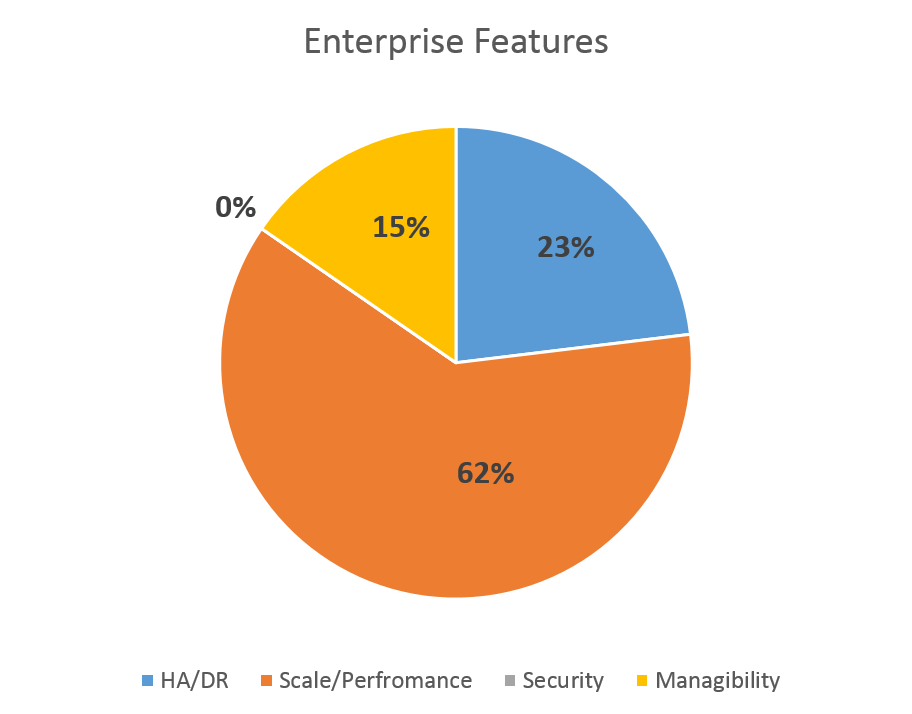
So back to SQL Enterprise.  I think the service provider community should listen to what other hosters have to say about SQL. Let’s look at the real IT wizards  (also known as ISV’s – those that develop applications) do with SQL Enterprise.  If you look at the chart below, this illustrates the features they use within Enterprise the most (Source: Microsoft)

Picture1

You can see (kind of unclearly) that scale and performance outweighs everything else. “Scale and Performance” means data compression, table partitioning, etc.  Over 23% say HA/DR is the most important feature. (always on).  I like to listen to these guys (ISV’s) since their business (their application) is only as good as the technology it resides on.  If they rely on a certain product over the other, I would like to better understand…why?  From the chart, it’s no surprise that performance ranks #1.  Imagine if performance was bad?  How good will their application look then?  So if they trust SQL Enterprise based off performance and HA…maybe you should give it a second glance.

From Microsoft, here’s the top 10 reasons hoster’s should consider Enterprise.  Oddly enough, virtualization wasn’t one of them.

1.More than 64GB memory

2.Online Re-Indexing

3.In-Memory OLTP

4.Always On Availability Groups

5.Partition Switching

6.Columnstore Indexes

7.Resource Governor

8.Change Data Capture

9.Transparent Database Encryption

10.Data Compression

Here are some good links on the topic below.  Feel free to check out.

SQL 2014 Overview

http://technet.microsoft.com/en-us/sqlserver/dn135309.aspx

SQL under SPLA

https://splalicensing.com/category/sql-2012/

SQL throughout the years – downloadable documents

http://www.microsoft.com/en-us/search/Results.aspx?q=sql&form=DLC

Thanks for reading,

SPLA Man


Leave a comment

Posted by on October 28, 2014 in SQL 2012


Tags: , , , , , , , ,

SPLA Audit start to finish

Your business is doing great, your sellers and customers are happy, you are making money instead of spending money, when out of the blue….BAM…you receive an audit letter.  Sound familiar?

So what do you do?  Your first reaction is panic.  Your second reaction is to call a lawyer.  Your third reaction is to blame your reseller.  I think that about sums it up.  If you disagree, I’m not 100% sure you are being truthful with yourself.  If you do agree, I also think you are making a HUGE mistake.  Sounds a little odd doesn’t it?

First thing you need to understand is it’s not your fault.  It’s not as if you are purposely trying to be out of compliant.  Microsoft knows this as well.  SPLA is a difficult program and very hard to understand. As I pointed out in the “About” section of this blog, there is little information written about the SPLA program leaving service providers vulnerable.  The SPUR?  Forget about it. That’s why I created this blog in the first place.

I think that is why SPLA customers call a lawyer to help guide them.  This may help you sleep at night, but is it REALLY helping?  I will let you determine that after the dust settles.

What does happen during an audit? I don’t care if this is the first step or fourth step but at some point you will have to collect data.  Data that PROVES the reason you reported the way you did.  One of the biggest mistakes a SPLA provider can make is not reporting indirect access.  Again, not your fault.  Who has any idea of what “indirect” really means?  Think of indirect as Microsoft software that is used to run your other applications that you market to your customers.  You have an application that you developed that reports back to SQL using Excel.  Users have no idea they are using SQL, all they know is the application they use.  But since SQL is part of your hosted solution…it must be reported.  Make sense?  That’s also why Windows will always need to be reported.  Try running Exchange without a Windows OS.  Not going to happen.

Data can also mean the licenses that your customers own that they bring over to your environment.  How do you know who owns what?  Are there enough CAL’s?  One of the arguments service providers make is they can go after their customers if being audited.  There’s an easy conversation right?  Remember, you want to keep customers not lose them.

Some service providers have learned that their end customers install software on VM’s without informing them.  How do you know what is actually being installed?  So take a look at your datacenter; are your customers installing software you don’t know about?  Collecting this information after the fact is a difficult process.  This leaves auditors with no choice but to make a best guess.  Best guesses can cost you significantly.

So after all this data is analyzed by the audit team, it is then delivered to Microsoft.  That’s when you present your case.  They will take things into consideration, but understand that if you are missing information, it makes your argument that much more difficult.  Don’t blame your reseller, that doesn’t work.  Don’t rely on a lawyer, that doesn’t always work either.  Educate yourself.  That’s the best advice I can provide.  Just by taking the time to read this I think you are on the right path.

Happy to walk you through the process in greater detail.  I am one of the few that actually gets it. My email is at the top righthand side of this page.

Thanks,

SPLA Man


Leave a comment

Posted by on September 18, 2014 in Compliance


Tags: , , , , , , , ,

CRM Price Increases

For those that read my earlier post “Predicting the future” one intuition has already come true.  Microsoft announced price increases for Microsoft Dynamics CRM come January, 2015.

All 3 SPLA CRM SKU’s are effected  (Basic, Essentials, and Service Provider/PRO edition).  For complete breakdown I would suggest reaching out to your SPLA reseller.

So why the increase?  Microsoft stated “The CRM price change is intended to more closely align our online and on premises pricing.”  So there you have it.

Windows, Core Infrastructure Suite (CIS) and other Dynamics AX, NAV, GP will also see increases.  This was previously announced by Microsoft and communicated through the reseller channel.

Thanks

SPLA Man

 
Leave a comment

Posted by on September 9, 2014 in CRM


Tags: , , , , , , , , , , , , , , , , , ,

Predicting the future…

Not an easy task.  When my kindergartener teacher asked “what do you want to be when you grow up?” I can promise you SPLA was not part of my vision.  (I should’ve worked harder to be a firefighter)

This post is 100% opinion based and would love the opportunity to hear/read yours. So here’s my take on SPLA and what’s next for the hosting industry.

Who will win the Amazon/Azure War? 

Contrary to popular opinion, I think Microsoft has already won this battle.  The reason might surprise you too as it has nothing to do with the service offerings or pricing; it has everything to do with who controls the licensing. I think we can all agree that Microsoft can make up their own rules to their own software.  What happens if Amazon spins up a Windows VM in their datacenter?  Amazon has to report it via SPLA.  Who ultimately get’s the SPLA revenue?  Microsoft.  What happens if Microsoft decides to offer fully hosted Windows 8 desktops using Azure or Office 365 but NOT authorize if for other service providers?  Yikes!!!  What happens if Microsoft authorizes MSDN mobility rights but not offer it for other service providers?  Oops…already happened.  What happens if they allow Office to be installed on 5 devices?  Oh man.

Will SPLA be replaced?

No.  Too  much revenue being generated for SPLA to just disappear.  SPLA produces recurring revenue for both Microsoft and the partner community.  Secondly, using SPLA does not mean that volume licensing is going away; Microsoft get’s the best of both worlds.  I do foresee volume licensing changing more rapidly than it already has.  I think that’s a good thing too.

Will VDI be allowed under SPLA in the foreseeable future?

No way.  This will never happen in my opinion. Let’s throw in the towel on this one.

Will the cloud industry expand or contract over the next decade?

Expand.  I think organizations will not only have hybrid/cloud environments but multi-cloud environments. As an example, I have multiple software vendors (such as Adobe for PDF’s, Symantec for Security, Microsoft for Office, etc) I believe organizations will use several vendors in “cloud” paving way for those service providers that have specialization and unique offerings to gain market share.  Yeah, they might not be the next Amazon, but they will be critical to the next phase of cloud. Specialization = Profitability.

Are all service providers going to be audited?

Yes.

Do I need to have a SAM practice?

Not if you don’t believe me in the previous question. Just don’t cry and say I didn’t warn you!

What will be the biggest driver to the cloud?

On premise compliance audits.  Once they get audited, they would rather have someone else worry about it; that someone else is you.

Will License Mobility be allowed for Windows?

No.  I don’t think there is a reason why it would.  Windows is cheap.  For those that have hosted for a while, remember the Windows Outsourcer/Non Outsourcer SKU’s?  Datacenter was over $200 a processor.  Standard was over $75 (US).

Will Microsoft raise rates?

Yes.

Will my hosting business succeed since I can’t compete against larger providers?

Yes.  You  need to change the way you promote your offering.  Think about this (and be honest with yourself) – what separates you from your competition?  If you were a customer looking for a hosted solution…why would “they”… choose “you”?  How can YOU… help ME (customer).  Is it to keep compliance?  Is it costs? Do your employees bring you new ideas or are they collecting pay checks?  Do you worry about being the lowest price or quality/uniqueness of your service?   Is it because you have an “in” and listen to SPLA Man?  If it’s the latter, you will win for sure.

Who’s the biggest threat to cloud providers present/future?

Governments

Will VDI be allowed under SPLA?

NOOOOO!!!!!  You asked this twice!  Come on! 🙂

Who will win the World Series in baseball?

Why…the St. Louis Cardinals of course!

Who will NOT win the Super Bowl this year?

St. Louis Rams – Ugh.

Thanks for reading,

SPLA Man


1 Comment

Posted by on September 8, 2014 in In My Opinion


Tags: , , , , , ,

Hybrid, Dedicated, and Shared Scenarios…

There are three deployment options for service providers – Hybrid (mix of on premise and cloud) Dedicated, and Shared.  In this article, we will break each one down to explain how they work and the options available.

Dedicated Scenario – (3 options available)

Option 1
Your customer decides to bring their own software (such as Exchange) and infrastructure (Windows) via their own volume licensing agreement. They do not have software assurance on the software. Can they do this?

Yes. Why? Everything is dedicated. Server, virtual machine all dedicated to one single organization. Software Assurance is NOT required.

Option 2
Your customer decides to bring the software but the hoster will provide the infrastructure in a dedicated environment. Again, customer does not need Software Assurance if it’s a dedicated environment. In this scenario, the hoster (you) will provide the Windows license via SPLA and not report the other applications the customer brings over since it is already covered via their own volume licensing agreement. This is applicable, it’s dedicated (VM and physical servers)

Option 3
Your customer is a healthcare company that needs a dedicated environment due to regulatory compliance. They do not own any software; they would need the hoster to supply the software licenses. Can they (the hoster) do this? Yes, the hoster would report everything under SPLA. The hoster (you) CANNOT use your own volume licensing agreement to provide the solution but you can certainly provide SPLA. Please be aware that if you own a volume licensing agreement, you cannot use the same hardware your volume licensing agreement resides as your hosted solution.

Also keep in mind that SPLA is non perpetual, when the customer leaves, they can no longer use the software they were accessing.

Summary of Dedicated –
Dedicated is applicable for both SPLA and end customer owned volume licensing. Dedicated also means dedicated hardware and dedicated VM’s. In dedicated environments, the end customer DOES NOT need software assurance. From a compliance perspective, it is defined as the following:

“Any hardware running an instance of Microsoft software (OS or application) must be dedicated to a single customer. For example, a SAN device that is not running any Microsoft software may be shared by more than one customer; since, a server or SAN device that runs Microsoft software may only be used by one customer.” (source: Microsoft VDA FAQ)

Hybrid Scenarios – 3 options available

Option 1
You decide to offer your customer a shared infrastructure but they want the same applications to run on premise. A good option would be to have the customer purchase the server applications (think Exchange, SharePoint, Lync) with software assurance (SA) and run them on premise. You (the service provider) would run the same applications in your shared environment BUT report the SAL for SA SKU. Much cheaper option than standard SPLA prices. I wrote about this here This also works well for Disaster Recovery options.

Option 2 (not really a hybrid but just go with it)
You can use license mobility. Microsoft likes to define this as a “hybrid option” but to me, hybrid insinuates the ability to run on premise and in your cloud. License mobility is a SA benefit for certain applications (SQL, CRM, SharePoint, Exchange, Lync) that allows customers to leverage their investment in SA and transfer those licenses into a hosters shared infrastructure. Reason why I don’t think this is truly a hybrid is the customer is TRANSFERRING licenses into your datacenter. This means that if a customer wants to move back to their own datacenter, they have to wait 90 days. (transfer license rule). With SAL for SA, nothing is being transferred. Windows does not have mobility rights, this will need to be reported under your own SPLA. I wrote about license mobility many times – here’s an article for your review – here You can also check out the Microsoft site for more of a definitive definition http://www.microsoft.com/licensing/software-assurance/license-mobility.aspx

Option 3
Good Ole’ SPLA. Customer can run their own servers on premise, you just report SPLA licensing in your shared environment. The new SPLA agreement even allows you to run SPLA software on customer owned hardware as long as you still manage it.

Shared Scenarios – 2 options

Option 1
License Mobility – see above

Option 2
SPLA. We all know what that is.

Summary

I hope this brings a bit more clarity. Sorry if some things are redundant but at the same time, some things are simply worth repeating. Here’s the takeaway – customer’s can always bring licenses into your datacenter. There is no law of the land that prohibits this. What is prohibited is the way you deploy the technology. There is only one option to install customer owned licenses in a shared environment and that is license mobility. Again, (here I go being repetitive) if Microsoft allowed customer owned licenses to be installed in shared environments than why would they create license mobility?

If you still have trouble comprehending all this, shoot me an email located at the top right of this page. One general rule of thumb – if it’s shared – 90% of the time SPLA is required.

Thanks for reading

SPLA Man

 
15 Comments

Posted by on August 27, 2014 in Compliance, License Mobility


Tags: , , , , , , , ,

More SQL 2012 Questions…..ANSWERED

Q. “When am I supposed to report SQL core licenses?”

A. When you sign a new SPLA or you deploy SQL 2012 you will be forced to license by cores

Q. “If we leverage SQL Server Enterprise, are we able to launch multiple VM instances of database across the enterprise?”

A. SQL 2012 Enterprise allows unlimited virtual instances.  In order to this with the 2008 version you would of had to license Datacenter edition.  (way expensive btw).  SQL 2012 does allow license mobility within server farms as well.  Check out the SPUR for details.

Q. “Does SQL 2012 Enterprise edition allow for downgrade rights?  In other words, can I have 2008 SQL servers and 2012 SQL servers running virtualized on the same host?”

A. Yes, as long as you are reporting SQL 2012 cores, you can run 2008 and prior.  Keep in mind, it has to match version.  For example, if you license Standard, you cannot run Enterprise.  If you license Enterprise, you can run Enterprise or Standard. 

Q. Can I just license the virtual, not the physical machine?

Yes. SQL does allow you to license just the virtual machines.  You would report the number of cores you assign to the server. (minimum of 4 cores). 

Q.  Can I license SQL Enterprise by user?

A.  No. Unfortunately SQL Enterprise can only be licensed by core.  SQL Standard and SQL Business Intelligence SKU can be licensed by user.

Thanks,

SPLA Man

 
2 Comments

Posted by on March 27, 2014 in Uncategorized


Tags: , , , , , , , ,

VDI for SPLA?

If I received a dollar for every time I’m asked this question you and I can both retire!  Things are changing in the world of data center outsourcing, but for some reason this is still stuck in the mud.  Why no VDI today?

1) I have no idea

2) See answer 1

I wrote about this topic earlier, but my hunch is it has something to do with the OEM manufactures.  OEM is a big piece of Microsoft business, and they protect it.  (Although Surface kind of muddies that theory).  As an example of this, if you were to “lease” a desktop to an end customer, you would first need a OEM license pre-installed and use SPLA and/or volume licensing as an upgrade license.  So even under a rented desktop model, OEM is still a requirement.  If everyone used VDI and dummy terminals – OEM manufactures would be left out of the game.  (at least in volume)

The only thing that would change this model is if they received a very high number of requests to offer this through Azure.  Look at what happened with Remote Desktop Services (RDS).  RDS was never part of license mobility.  Azure comes along and before you know it- RDS has mobility rights! Check it out here

That being said, Microsoft can make the rules of their own game, and even know Microsoft can do it does not mean the service provider/partner community can do it.  Office 365 is a prime example of this.  Under O365, you can take Office and install it on up to 5 PCs. Try that under SPLA and you have to license every PC with a separate Office license, use Windows 7/8 upgrade license, have a OEM on the machine that you own, and sign a rental addendum.  That’s why I wrote “office needs mobility rights”

One new capability in the latest SPLA agreement is you can install software on customer owned hardware.  BUT guess what?  That does not apply to PCs.

I’m not sure if this will ever change.  Every conference that I’ve attended the past 10 years partners ask the same question – “Can I provide VDI under SPLA?” I don’t like the word “no” but unfortunately, the answer is “no.”

Would love to hear about your thoughts on the topic.  Have you tried Windows server and RDS as an alternative?  What about dedicated environments for VDI?

Thanks for reading,

SPLA Man

 
7 Comments

Posted by on March 26, 2014 in VDI


Tags: , , , , , , , , ,

SPLA Compliance Audit- How Not to be the Chosen One!

If you recently went through an audit or just nervous about being notified, I outlined ten steps that service providers can take to arm themselves more efficiently and be compliant.

  1. If you are running Microsoft software, you must license Windows.  All Microsoft software runs on a Windows OS.
  2. If you are licensing SharePoint- SharePoint requires SQL and Windows.
  3. Reporting SharePoint Enterprise you must license SharePoint Standard
  4. Installing Office on a server requires Remote Desktop (RDS) licenses.  Office and RDS licenses should match (cannot have more Office licenses than RDS licenses)
  5. If you have customers bringing licenses into your hosted environment you need to host it in a physical and dedicated environment.  (nothing shared among other customers)
  6. If you are reporting user licenses (SAL- Subscriber Access License) you need a license for each user that has access.  For example, if you have 10 totals users in the month of May and only 4 actually use or access that software, you must license all 10.  SPLA user licenses are similar to your cable bill; your cable provider is going to charge you regardless if you turn your TV on or not.
  7. If you have customer owned licenses in your environment, you must keep all relevant documentation.  This includes enrollment information, start date, end date, and who they bought the licenses from.
  8. Renting out a PC make sure the PC has an OEM license preinstalled.
  9. No virtualizing/streaming Windows desktop OS from a datacenter.
  10. You can install your server on a customer premise, but do not install SPLA software on your customer’s server!

This is not bulletproof by any means.  Use this as a guide when looking at your own environment.  Look at it from the auditors eyes.  What information would they need to verify that I am compliant? The SPUR (Service Provider Use Rights) is the best reference when it comes to Microsoft SPLA.  You can download a copy here.  If you have trouble sleeping at night; this is a must read.

Thanks for reading,

SPLA Man

 
1 Comment

Posted by on March 5, 2013 in Compliance


Tags: , , , , , , , , , , , , , , , , , , , ,